Free spreadsheet
Free paycheck budget spreadsheet
A paycheck budget template that opens in Google Sheets, Excel and Numbers. Type your payday and it lists the bills due before the next one. Then split what's left until nothing is left to assign.
Excel workbook (.xlsx) · 13 KB · No email, no sign-up
What's in it
- Start here. How to use the file, and where you type how often you're paid and your usual take-home pay.
- Bills. Each monthly bill, its amount and the day of the month it's due, with a total. There's room for 20.
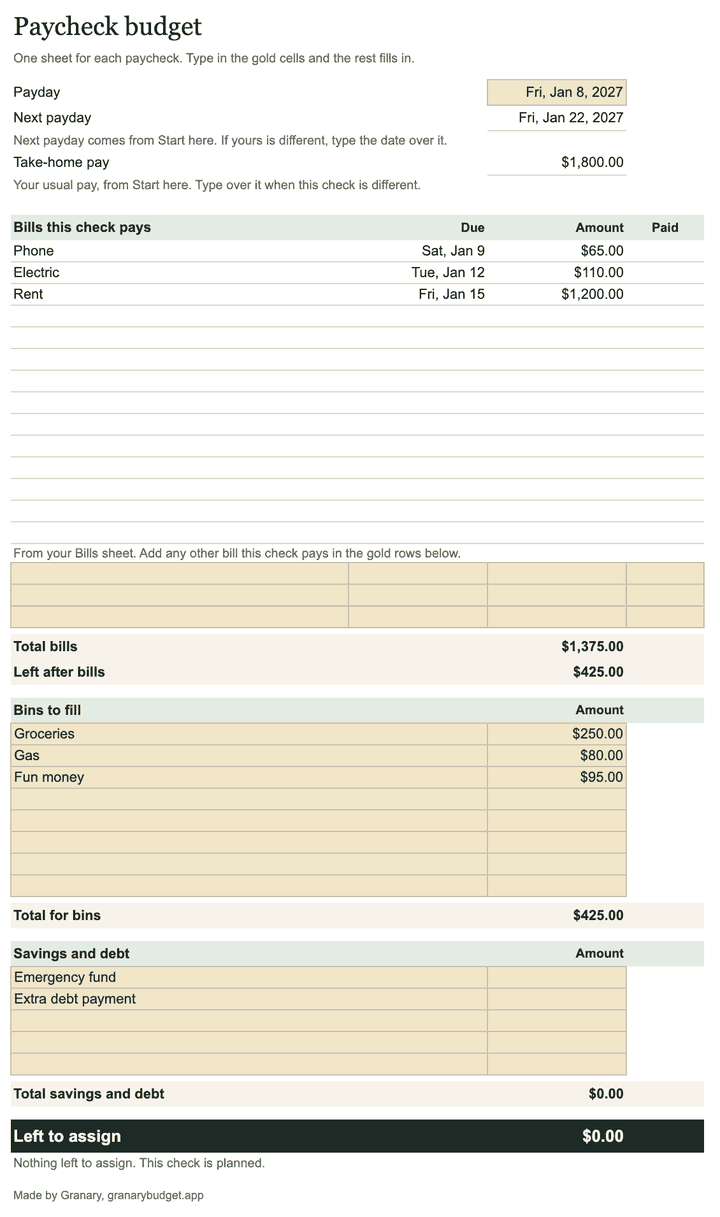
- Paycheck. One sheet for each payday: the bills this check pays, money set aside by bin, savings and debt, and what's left to assign.
The file opens with an example to type over: $1,800 every two weeks and the seven bills from how to budget biweekly paychecks.
How it works
Open it in Google Sheets
- Go to sheets.google.com and start a blank spreadsheet.
- Choose File, then Import, then Upload, and pick the file you downloaded.
- Choose Replace spreadsheet, then Import data.
Or upload the file to Google Drive and open it there. Sheets opens it as an Excel file. To keep it as a Sheets file, choose File, then Save as Google Sheets.
Open it in Excel
Open the file from your Downloads folder. On Windows, Excel may open it in Protected View because it came from the internet. Click Enable Editing and you can type. The file has no macros, so there's nothing else to allow.
Open it in Numbers
On a Mac, open Numbers, choose File, then Open, and pick the file. On an iPhone or iPad, open Numbers, tap Browse, find the file in Downloads and tap it. Numbers makes its own copy, so your changes are saved as a Numbers spreadsheet.
How to use it on payday
- Set it up once. On Start here, type the days between your paydays and your usual take-home pay. The file is set for biweekly pay, every 14 days. Paid every week? Make it 7. On Bills, list each monthly bill, its amount and the day it's due, in any order.
- Type your payday. On the Paycheck sheet, type the date in the gold cell. Every bill due from that day to the day before your next payday fills in, earliest first, with a total and what's left after bills.
- Add anything that isn't monthly. A car registration or a one-time bill goes in the gold rows under the list.
- Fill your bins. Groceries, gas and whatever else has to last until the next check. Bin is Granary's word for envelope.
- Send the rest to savings and debt. Keep moving money between the lines until Left to assign reads $0.00.
- Next payday, duplicate the sheet. Right-click the Paycheck tab and choose Duplicate. In Excel, choose Move or Copy and tick Create a copy. Then type the new payday.
Paid twice a month or once a month? Type your next payday on each Paycheck sheet, over the date the file works out.
What a spreadsheet won't do
A spreadsheet holds the plan. It can't see what happens after payday.
- You keep it up by hand. Nothing is logged unless you open the file and type it in.
- It shows what you set aside for groceries, not what's left of it on Thursday.
- Every payday needs a new copy and a new date.
If that suits you, the spreadsheet is all you need.
More free tools
- The paycheck budget printables are the same worksheet on paper, as PDFs.
- The paycheck bill planner shows which paycheck pays which bill.
- The payday calendar lists every payday of 2027.
- The 3 paycheck months calculator shows which months of 2027 bring a third check.


